Lynbrook Music: Google Sheets as a Headless CMS
Replacing a 2000s Google Site with a high-speed Next.js static architecture managed by non-technical volunteers via Google Sheets.
Hosting Cost
$0 / Month
Security
Unhackable Static
Admin Overhead
Zero Code
The Lynbrook High School Instrumental Music Program (LIMB) supports hundreds of student musicians across multiple orchestras and marching bands. For years, the program relied on an outdated, 2000s-era Google Sites page.
Updating performance schedules, event details, and donation forms was tedious, error-prone, and required manual edits using a clunky Google Sites interface. Volunteer parents and music directors needed a modern, mobile-responsive platform, but had zero budget for monthly database hosting and no technical staff to maintain complex CMS software.
I engineered a bespoke solution: a 100% static Next.js application deployed to Cloudflare Pages that uses Google Sheets as a Headless CMS.
The Google Rate-Limit & Build Caching Challenge
Rather than making expensive client-side API requests to Google Sheets on every pageview, I published each spreadsheet tab as a public CSV and parsed the data at build time using PapaParse.
However, during automated CI/CD static site generation (SSG), worker build processes triggered Google's rate-limiting algorithms, causing Google to return HTML captcha pages instead of raw CSV data.
To solve this, I engineered a local disk-caching layer that persists parsed CSV data during the build phase:
// Disk Build-Cache Layer to bypass Google Rate-Limiting during SSG
async function getDiskCache<T>(key: string): Promise<T[] | null> {
  if (typeof window !== "undefined") return null;
  try {
    const fs = await import("fs");
    const path = await import("path");
    const cacheDir = path.join(process.cwd(), ".next", "cache", "sheets");
    const cacheFile = path.join(cacheDir, `${key}.json`);

    if (fs.existsSync(cacheFile)) {
      const content = fs.readFileSync(cacheFile, "utf8");
      const parsed = JSON.parse(content);
      if (Array.isArray(parsed) && parsed.length > 0) return parsed as T[];
    }
  } catch {
    return null;
  }
  return null;
}

export async function fetchSheetData<T>(fullUrl: string): Promise<T[]> {
  const cacheKey = Buffer.from(fullUrl)
    .toString("base64")
    .replace(/[/+=]/g, "");
  const cachedData = await getDiskCache<T>(cacheKey);
  if (cachedData) return cachedData;

  // Fallback to fetch if not cached
  const res = await fetch(fullUrl, { cache: "no-store" });
  const csvText = await res.text();
  // Parses CSV via PapaParse...
}
Bypassing Google Drive CORS & Image Load Artifacts
Volunteer parents upload concert photography directly to Google Drive. However, Google Drive blocks direct browser hotlinking and cross-origin (CORS) image requests.
To overcome this, I engineered two complementary layers:
Server-to-Server Edge Image Proxy
I deployed a serverless Cloudflare Worker that fetches images directly from Google Drive server-to-server and streams them back to the user with an aggressive 7-day CDN edge cache.
// Serverless Cloudflare Worker Image Proxy with 7-Day Edge Cache
export const onRequestGet: PagesFunction = async (context) => {
  const url = new URL(context.request.url);
  const id = url.searchParams.get("id");
  if (!id) return new Response("Missing File ID", { status: 400 });

  const driveUrl = `https://drive.google.com/uc?export=download&id=${id}`;
  const driveRes = await fetch(driveUrl);

  return new Response(driveRes.body, {
    status: 200,
    headers: {
      "Content-Type": driveRes.headers.get("content-type") || "image/jpeg",
      "Cache-Control": "public, max-age=86400, s-maxage=604800", // 7-day CDN cache
      "Access-Control-Allow-Origin": "*",
    },
  });
};
Perceptual UX: Masking Image Scan Lines
When Google Drive images load, they render line-by-line in an unsightly "scanning" animation. I created a custom component that keeps the image at 0% opacity until fully downloaded, then smoothly transitions opacity using a Cubic Bézier curve.
// Perceptual Opacity Transition Component
export default function CinematicImage({ src, targetOpacity = 0.35, alt, style, ...props }: CinematicImageProps) {
  const [isLoaded, setIsLoaded] = useState(false);
  if (!src) return null;

  return (
    <Image
      {...props}
      src={src}
      alt={alt || "Image"}
      onLoad={() => setIsLoaded(true)}
      style={{
        opacity: isLoaded ? targetOpacity : 0,
        transition: "opacity 1000ms cubic-bezier(0.16, 1, 0.3, 1)",
        ...style,
      }}
    />
  );
}
Dynamic Navigation & Auto-Expiring Events
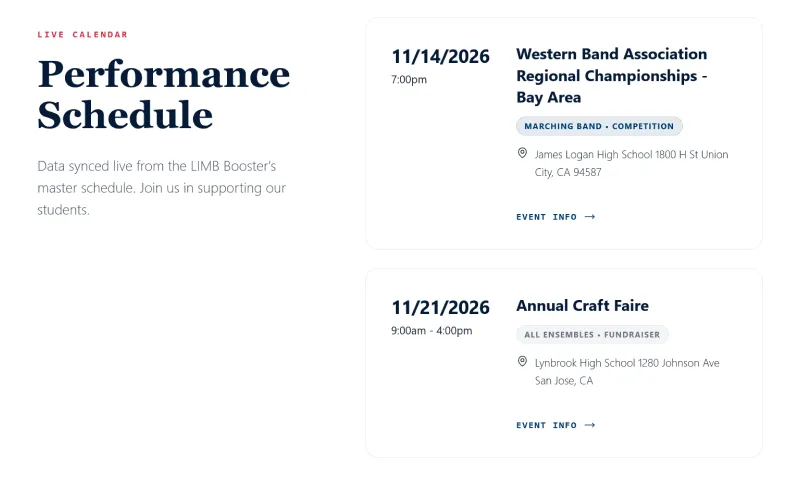
The navigation menu is generated dynamically from the Google Sheet at build and mount time.
When directors create a new ensemble in the spreadsheet, a new menu item automatically appears on the live website. Concert schedules evaluate event timestamps against midnight, automatically removing past performances from the navigation menu so the site never looks abandoned or out-of-date.
// Auto-expiring events logic inside Navbar.tsx
const now = new Date();
now.setHours(0, 0, 0, 0); // Keep today's events visible until midnight

const activeEvents = eventsData.filter((evt) => {
  const cleanDate = evt.date.replace(/^[A-Za-z]+,\s*/, "");
  const eventDate = new Date(cleanDate);
  if (isNaN(eventDate.getTime())) return true; // Keep "TBA" events
  return eventDate >= now; // Only keep events happening today or in the future
});
Structured SEO: Schema.org Event JSON-LD
To ensure school concerts rank prominently in local Google Search results, I engineered a custom component that injects Google Structured Data directly into the HTML header:
// Injects Schema.org JSON-LD Structured Data for Google Rich Snippets
export default function EventJsonLd({ title, description, startDate, endDate, imageUrl, eventUrl }: EventJsonLdProps) {
  const schema = {
    "@context": "https://schema.org",
    "@type": "Event",
    name: title,
    description: description,
    startDate: startDate,
    endDate: endDate,
    eventAttendanceMode: "https://schema.org/OfflineEventAttendanceMode",
    eventStatus: "https://schema.org/EventScheduled",
    image: imageUrl,
    location: {
      "@type": "Place",
      name: "Lynbrook High School",
      address: {
        "@type": "PostalAddress",
        streetAddress: "1280 Johnson Ave",
        addressLocality: "San Jose",
        addressRegion: "CA",
        postalCode: "95129",
      },
    },
  };

  return (
    <script type="application/ld+json" dangerouslySetInnerHTML={{ __html: JSON.stringify(schema) }} />
  );
}
Total Infrastructure Overhead
$0 / Month
Cloudflare Pages edge hosting combined with Google Sheets CSV data delivery eliminates monthly database and hosting fees permanently.
Business Impact & Community Empowerment
By transforming an outdated Google Site into a statically compiled, spreadsheet-driven platform, I helped Lynbrook Instrumental Music achieve:
- 100% Non-Technical Autonomy: Volunteer parents and music directors update concert schedules, vendor directories, and attire forms inside a simple Google Spreadsheet.
- $0 / Month Infrastructure Cost: Zero database hosting fees, zero server maintenance, and zero vulnerability to security hacks.
- Rich Organic Search Traffic: Google automatically displays event rich-snippets with dates, times, and venue locations directly in search results.
Deploy this system for your business.
Update your live website straight from Google Sheets. Transparent baseline setup starting at $5,500 with $0.00/month in hosting costs.
Need a bespoke architecture?
Let's discuss how to engineer a high-speed, zero-SaaS system tailored to your business operations.